
Find and delete similar photos on iPhone, iPad and Mac
Photo Cleaner groups similar shots, puts the best one first, and clears the rest in one tap.




From a messy camera roll to one good shot
Scan on your device
Photos taken moments apart are compared. Nothing is uploaded.
Best shot first
Ranked by sharpness and Apple’s on-device Vision framework.
Keep Best, or choose
Clear every set at once or pick by hand. Deleted photos stay recoverable for 30 days.
Why your library fills up with near-duplicates
A camera that shoots fast makes it easy to take five photos of the same moment: one with closed eyes, one slightly tilted, one a little darker. You keep meaning to pick the best one later. Later never comes.
Deleting them by hand means comparing nearly identical pictures one by one. Photo Cleaner does the comparing for you. It looks at photos taken moments apart, groups the ones that match, and shows the best shot of each set first.
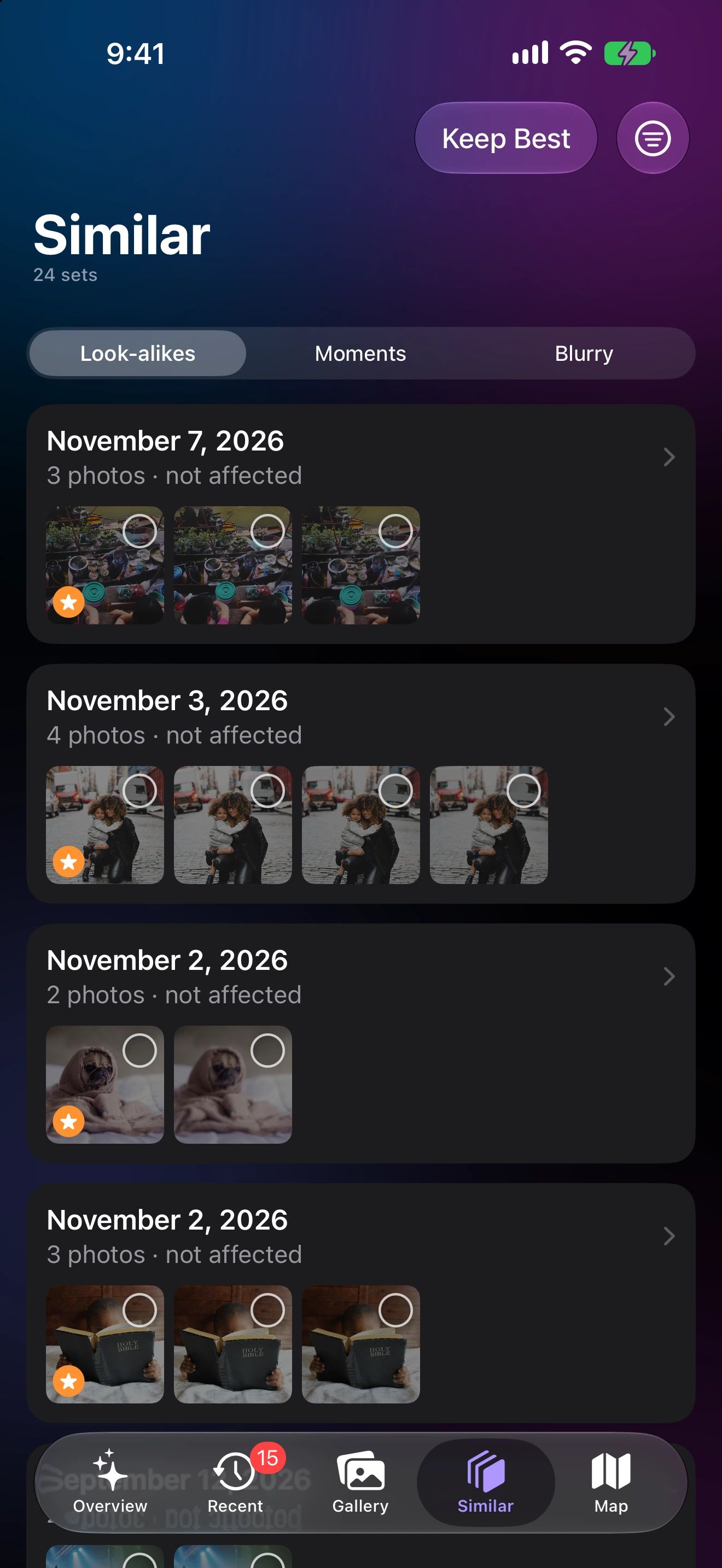
There are three ways to look: Look-alikes for near-duplicates, Moments for bursts taken within a couple of minutes, and Blurry for shots that didn’t come out sharp. In every case the decision stays with you.
How the best shot is chosen
Each photo in a set gets a sharpness measurement and a quality score from Apple’s on-device Vision framework. The sharpest, best-looking shot leads the set and is marked Best. If you prefer another one, tap it: your choice wins.
Tune the match
From the filter menu you can choose how close photos must be: near-identical, similar or same scene. Sort sets by the number of photos or by size to start where you’ll free the most space, and limit the scan to a timeframe such as the last month.
Safe by design
Every set starts with every photo kept. Nothing is deleted until you press Keep Best or pick photos yourself, and iOS asks you to confirm. Deleted photos go to Recently Deleted in the Photos app for 30 days.
Similar Photos questions
How does Photo Cleaner choose the best photo?
It measures how sharp each shot is and scores how good it looks with Apple’s on-device Vision framework. The highest score leads the set, and you can change the pick.
Will it delete anything without asking?
No. Every photo in a set is kept until you choose Keep Best or pick photos yourself, and iOS asks you to confirm before anything is deleted.
How close do photos have to be to count as similar?
You choose in the filter menu: near-identical, similar, or the same scene. You can also sort sets by number of photos or size, and limit the scan to a timeframe.
Can I get deleted similar photos back?
Yes. They move to Recently Deleted in the Photos app and stay there for 30 days.
