
See what takes up space in your photo library
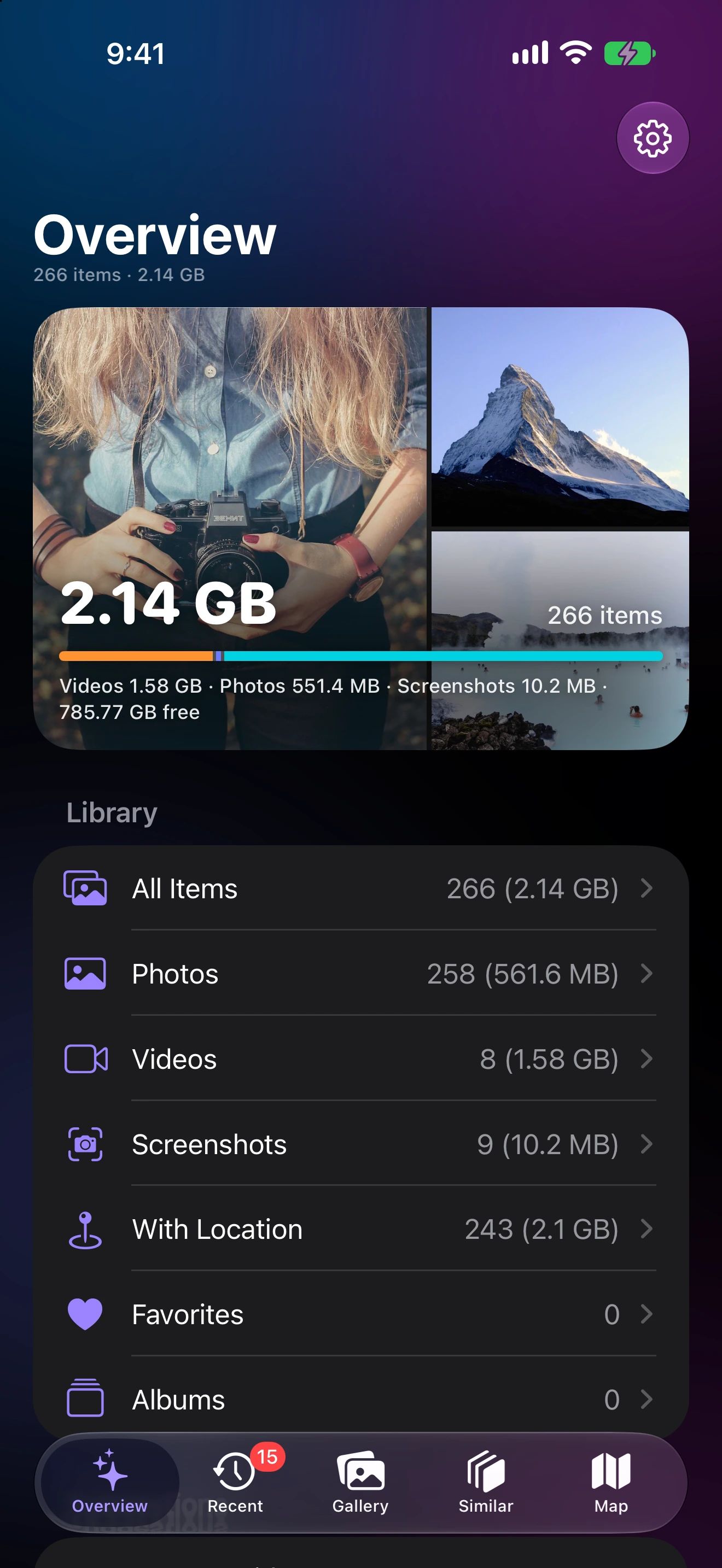
One screen shows how much space photos, videos, Live Photos and screenshots take, and how much is free on your device.
From “Storage Almost Full” to a plan
Open the app
Photo Cleaner reads your library and measures the real size of every item.
See the split
Videos, photos, Live Photos and screenshots, each with its total.
Jump to a fix
Tap a row to browse it, or a suggestion to go straight to the largest videos or similar shots.
Why the iPhone Storage screen isn't enough
When your iPhone warns that storage is almost full, the Storage screen in Settings tells you that Photos is big. It doesn’t tell you what inside Photos is big.
Photo Cleaner splits your library by type, with a real total for each. Most people find that a handful of videos take more space than thousands of photos, and that screenshots quietly add up too.
What the overview shows
- Library total: the size of every photo and video on the device, measured item by item.
- Videos, photos, Live Photos and screenshots: each with its own share of the total, in a ring and a list.
- Free space: what’s left on your iPhone, iPad or Mac, so you know how much you need to clear.
- Library rows: all items, photos, videos, screenshots, items with a location, favorites and albums, each with its count and size.
- Suggestions: how much your largest videos use, how many look-alike sets and blurry shots were found, and how many new items are waiting for review.
From numbers to action
Every number links to the items behind it. Tap Videos to see them largest first, tap Screenshots to see years of them in one grid, or follow a suggestion straight to the look-alike sets worth clearing. You see the size of what you select before anything is deleted.
Measured on your device
Sizes come from the Photos framework on your device. Nothing is uploaded and there’s no account. On a large library the first measurement takes a little while; after that, only new items need measuring.
A good first pass
- Start with the largest videos: few decisions, most space.
- Clear look-alike sets with Keep Best.
- Remove old screenshots you no longer need.
- Empty Recently Deleted in the Photos app if you need the space right away.
Storage Overview questions
Where does Photo Cleaner get the sizes from?
It asks the Photos framework for each item's file size on your device. Nothing is uploaded, and the first measurement can take a moment on a large library.
Why doesn't the total match iPhone Storage in Settings?
Settings also counts thumbnails, caches and other app data, and with Optimize iPhone Storage some originals live only in iCloud. Photo Cleaner shows the size of the photos and videos themselves, so you can see which kind takes the most.
Does it work on Mac?
Yes. The same overview is available on iPhone, iPad and Mac, for the library on that device.
